
Free demo (7 days)
Full features for 7 days. Test Meetings, Dashboards and Email Follow-ups with real workflows.
⬇ Demo 20% off during the demoStop getting lost in scattered spreadsheets. Owners, deadlines, priorities, progress, meetings and follow-ups — all organized in one place.
Try it free for 7 days and buy with 20% off during the demo period.
 Stripe
| Feature | Demo | Full | Basic |
|---|---|---|---|
| Tasks + Meetings | ✓ | ✓ | ✓ |
| Dashboards | ✓ | ✓ | ✓ |
| Email reminders | ✓ | ✓ | ✓ |
| Reports (PDF/Excel/CSV) | ✓ | ✓ | ✓ |
| Ready-to-use tools (Eisenhower + Ivy Lee) | ✓ | ✓ | ✗ |
| Works offline | ✓ | ✓ | ✓ |
| License | 7-day trial | Lifetime access | Lifetime access |
eTask is a professional Excel task manager for teams built to transform Excel into a complete system for tasks, meetings and follow-ups. It centralizes tasks, owners, deadlines, priorities and progress tracking in a single structured environment inside Excel.
Beyond basic task tracking, eTask includes a dedicated Meetings Panel, dashboards and charts for management routines, and an integrated Email Center to send structured updates and follow-ups directly from Excel. Everything runs locally with VBA, without subscriptions, external platforms or cloud dependency.
The Full Edition includes advanced productivity frameworks such as the Eisenhower Matrix and the Ivy Lee Method. The Basic Edition includes the full core system, excluding only these two methods.
If you're looking for an Excel-based task and meeting management system with dashboards, reports and built-in email communication, eTask was created specifically for professional team workflows inside Excel.
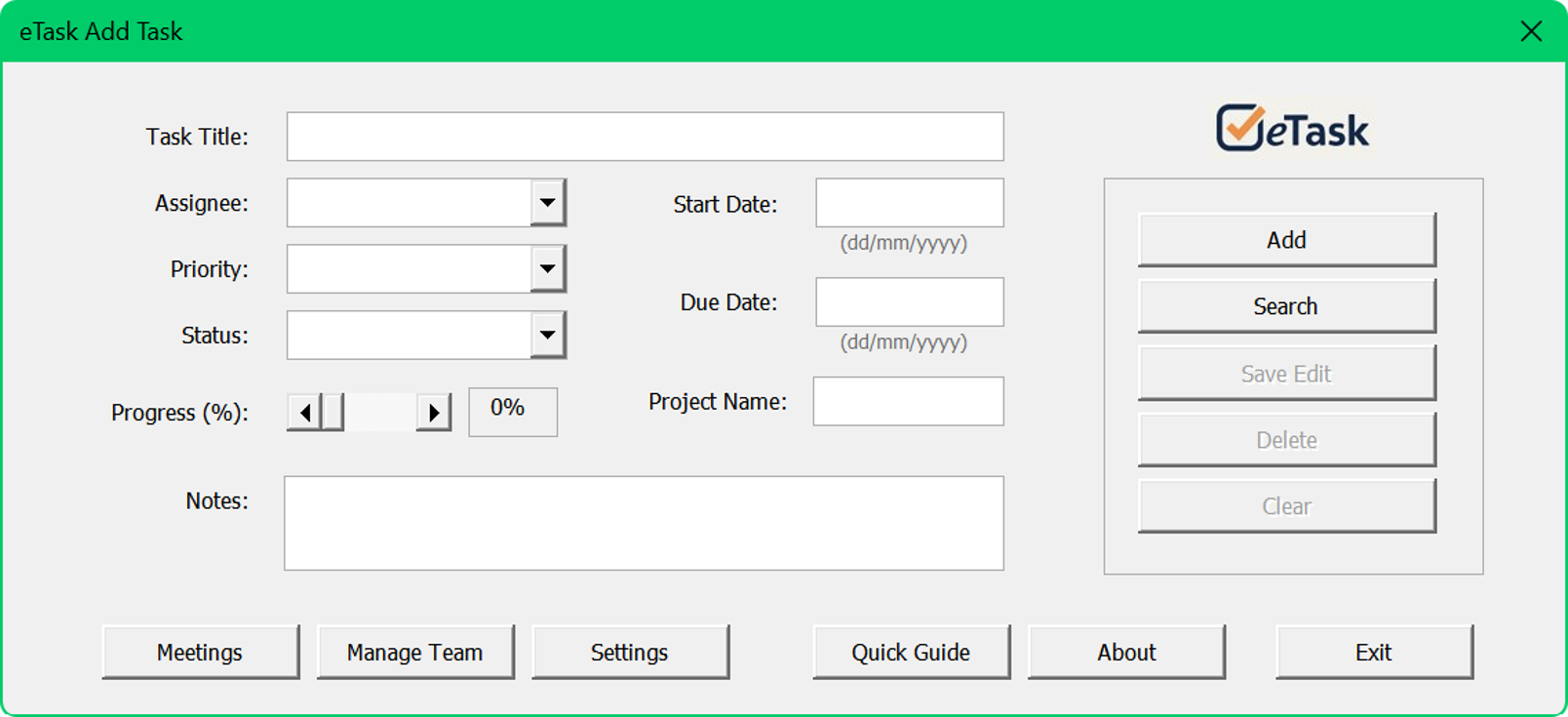
Main screen to create, edit, search and manage tasks.
The Add task screen is the central interface of eTask. Here you create and manage tasks, defining title, owner, dates, priority, progress, notes and project. This is the most used screen in day-to-day work.
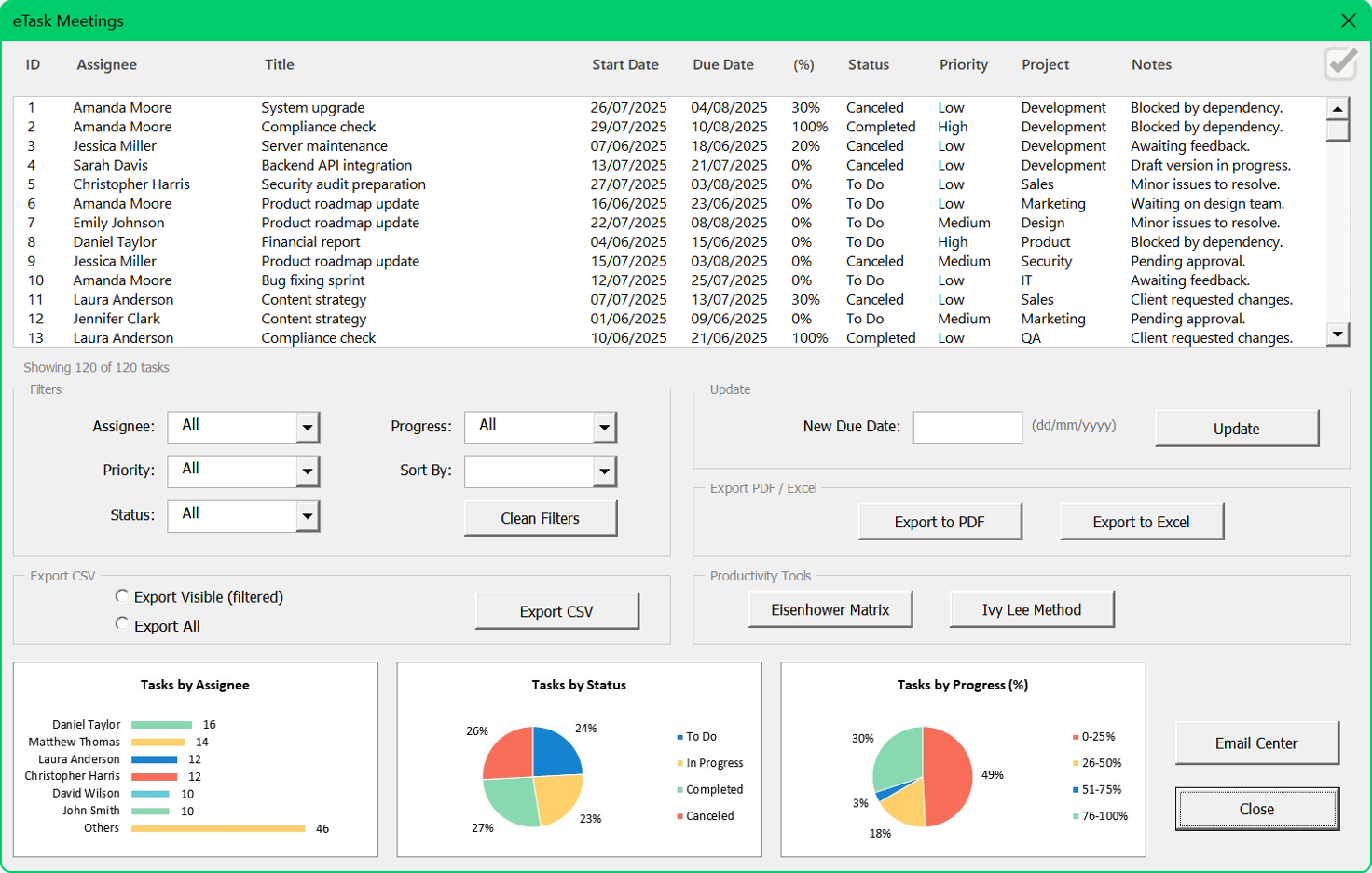
Hub to review tasks, negotiate deadlines and document meetings.
The Meetings panel is the control center for team reviews. It lets you apply filters, adjust deadlines, identify bottlenecks, validate progress and export reports to PDF, Excel or CSV.
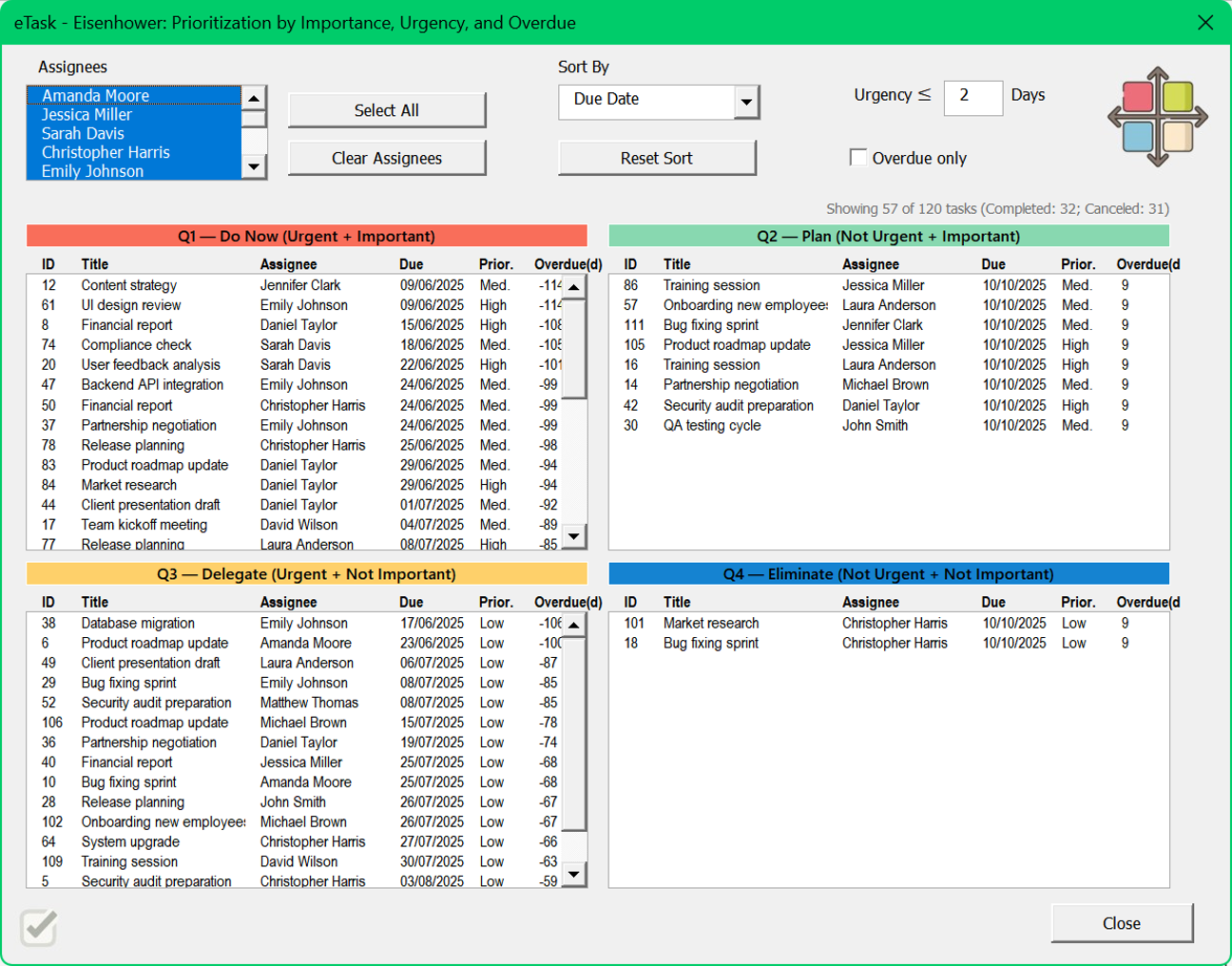
Organize priorities with the Urgent × Important method.
Distribute tasks into four quadrants: do now, schedule, delegate and eliminate. Smart filters highlight urgent, overdue and critical activities.
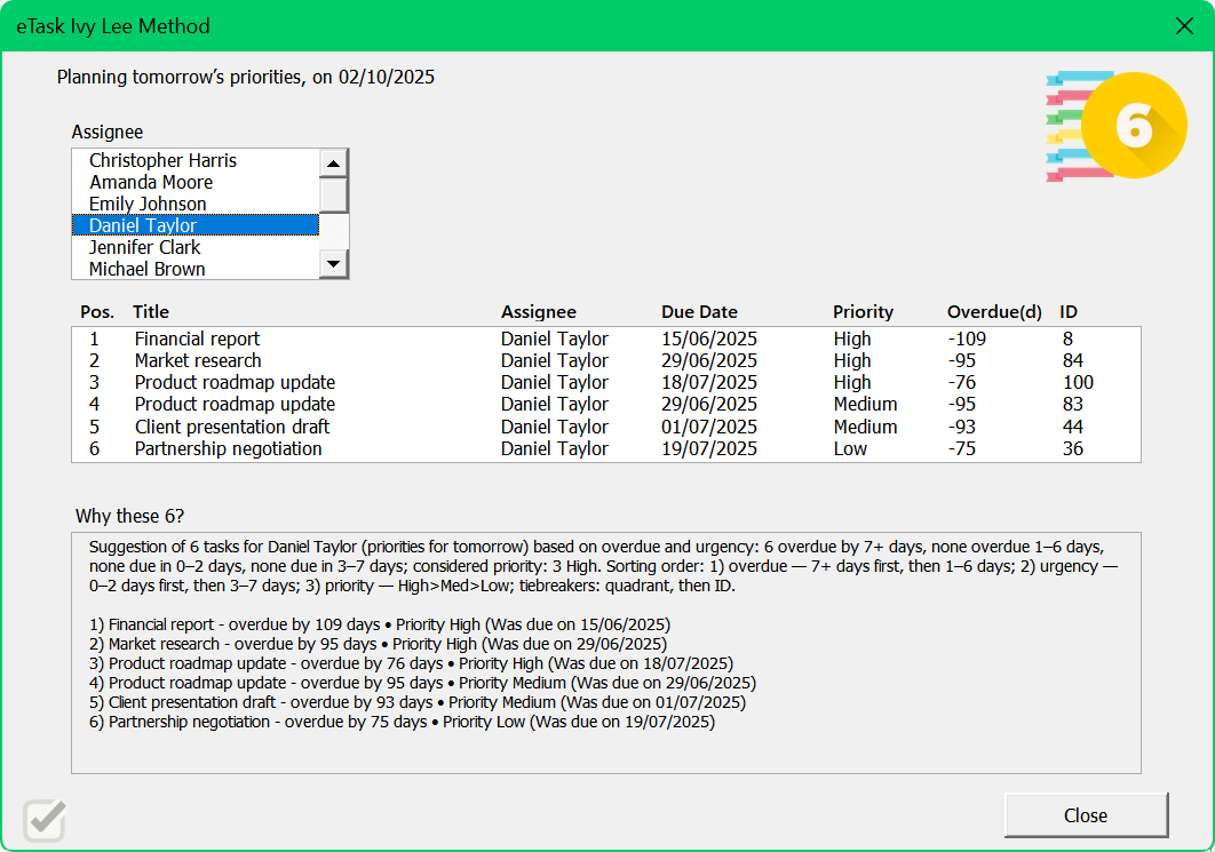
Automatically suggests your 6 most relevant tasks for the next day.
Defines up to six essential tasks considering urgency, overdue status and priority. Reduces overload and directs focus to what matters.
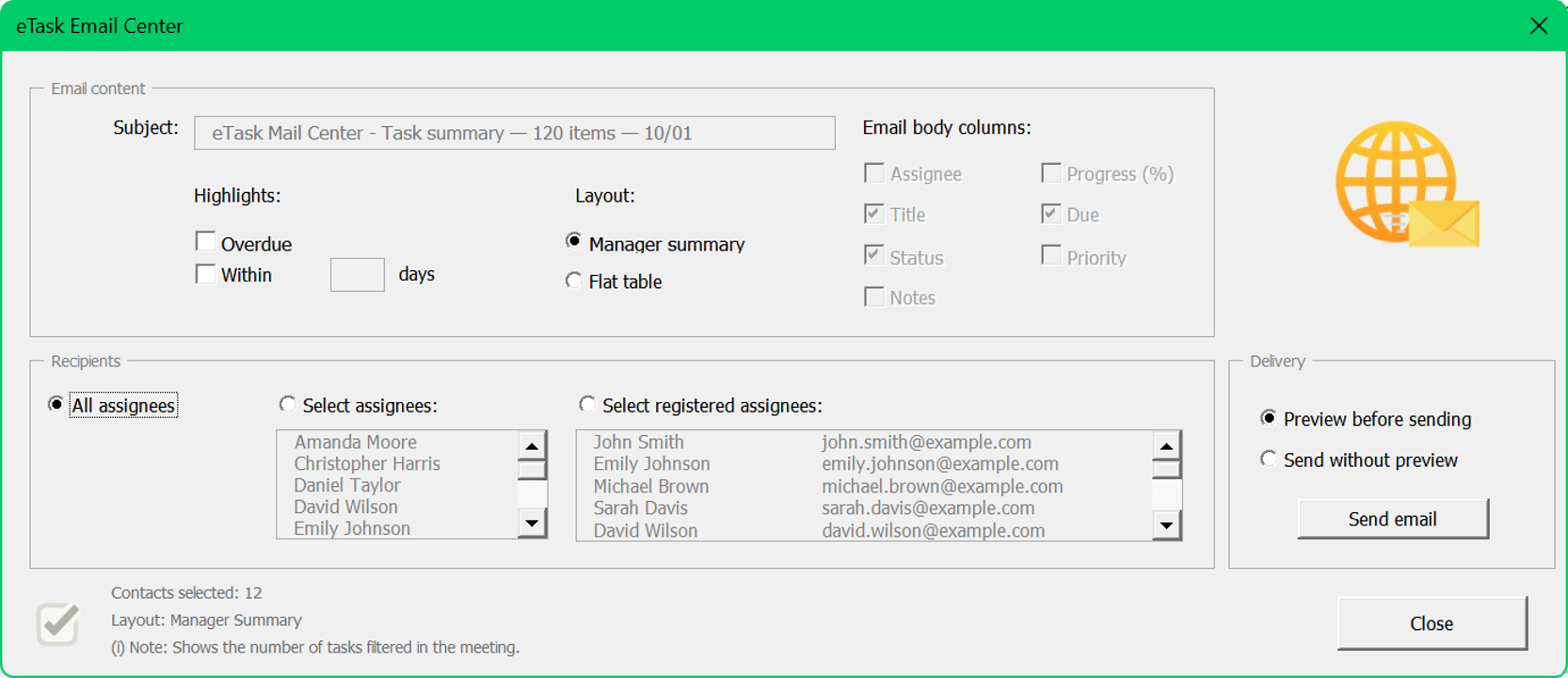
Send automatic task summaries to your team.
Configure filters, visible columns and recipients to send automatic summaries after meetings and quick check-ins.
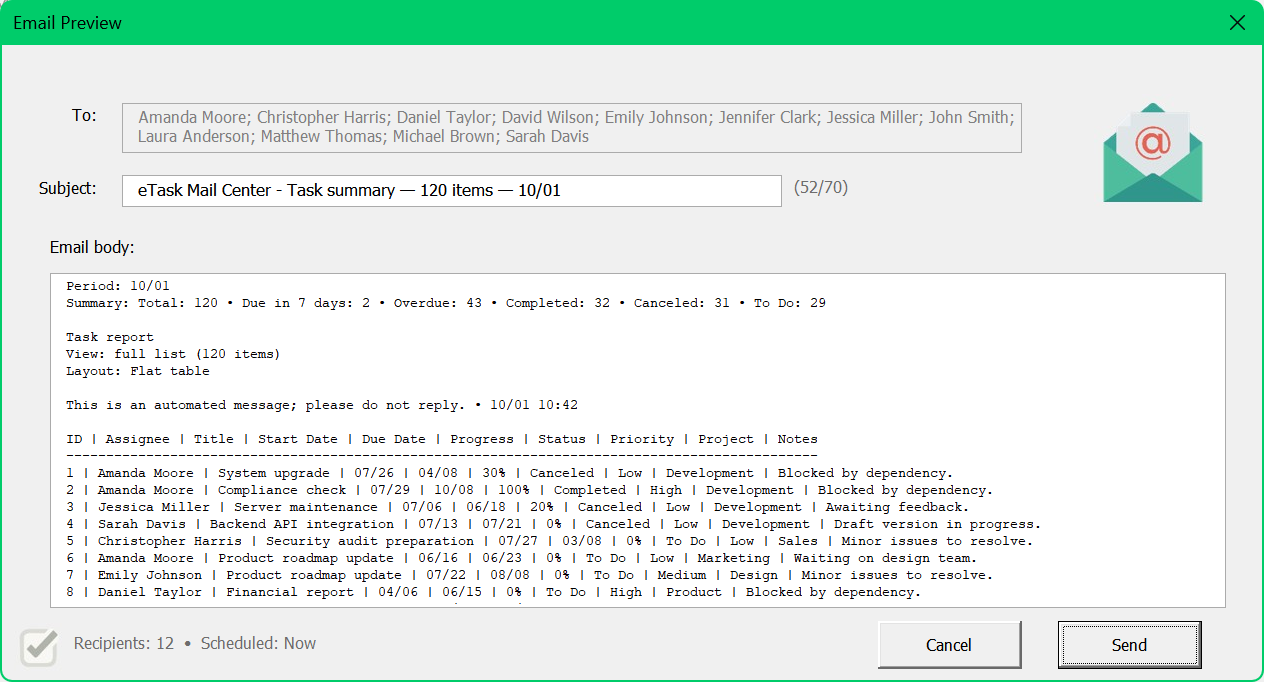
See exactly how the email will look before sending.
Shows the complete email layout before sending, ensuring clear and professional communication.
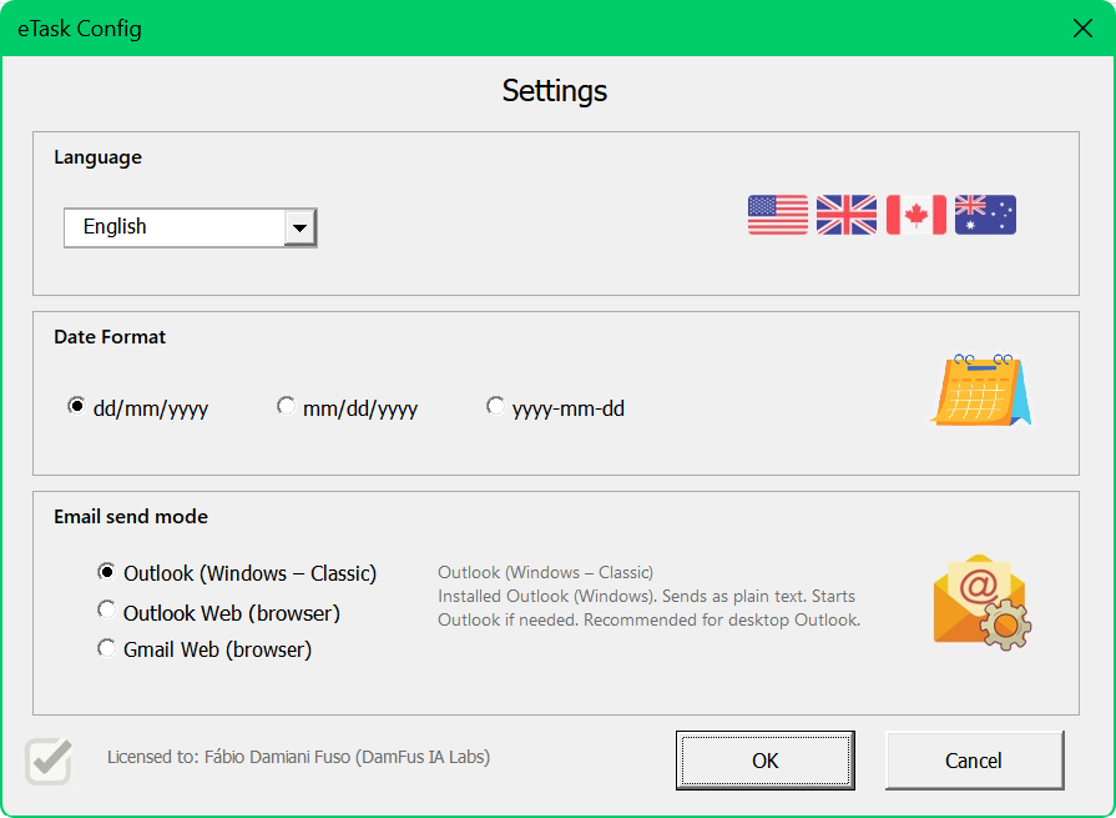
Customize language, date format and system preferences.
Adjust language, date format and general settings. These settings apply to the whole interface.
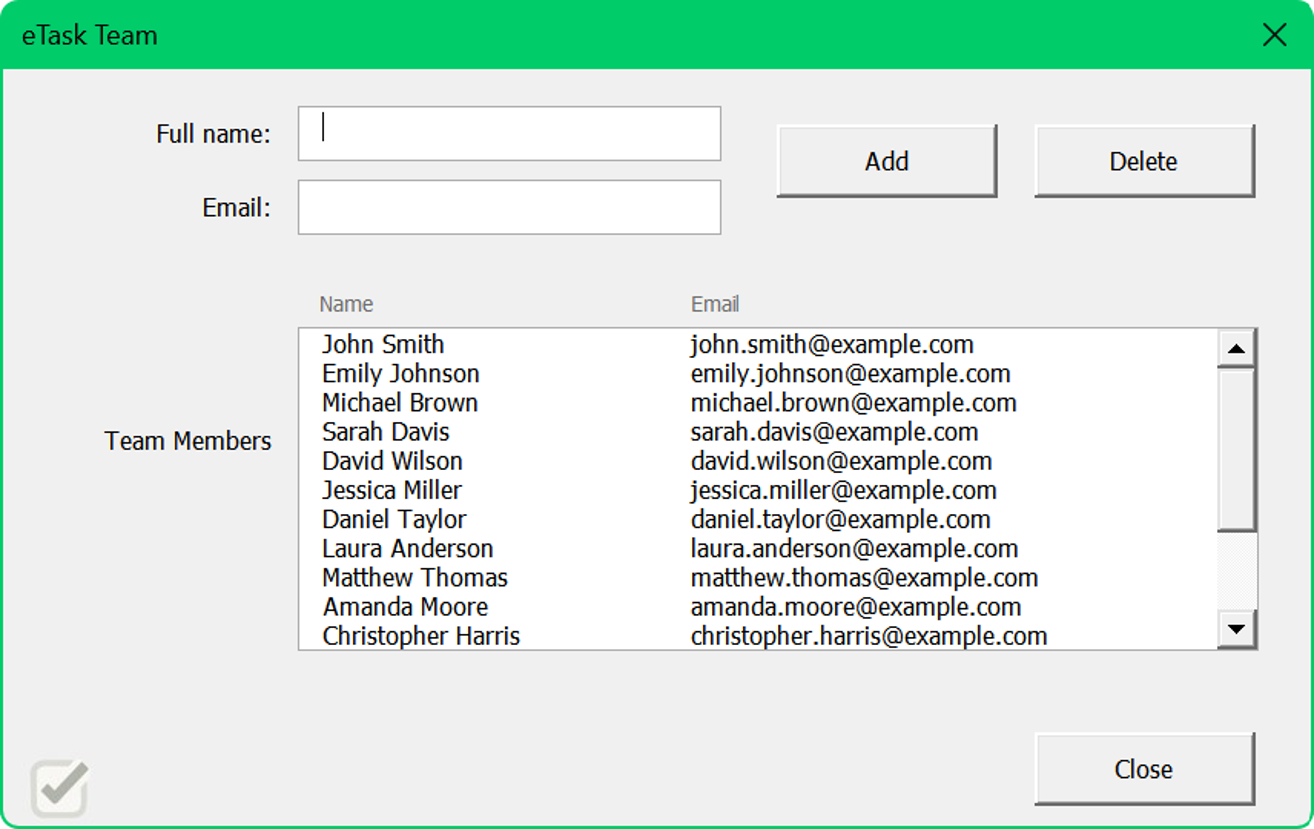
Register members and standardize your user base.
Keep names consistent and emails correct for task assignment and reliable notifications.
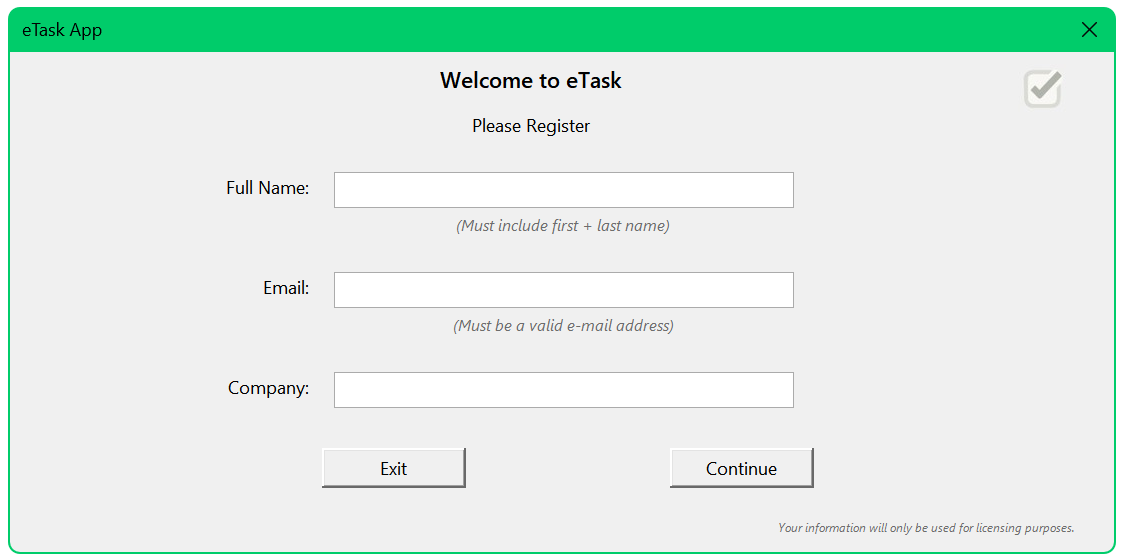
Fill in your initial details to activate eTask.
Initial screen to enter basic user information needed for identification and licensing.
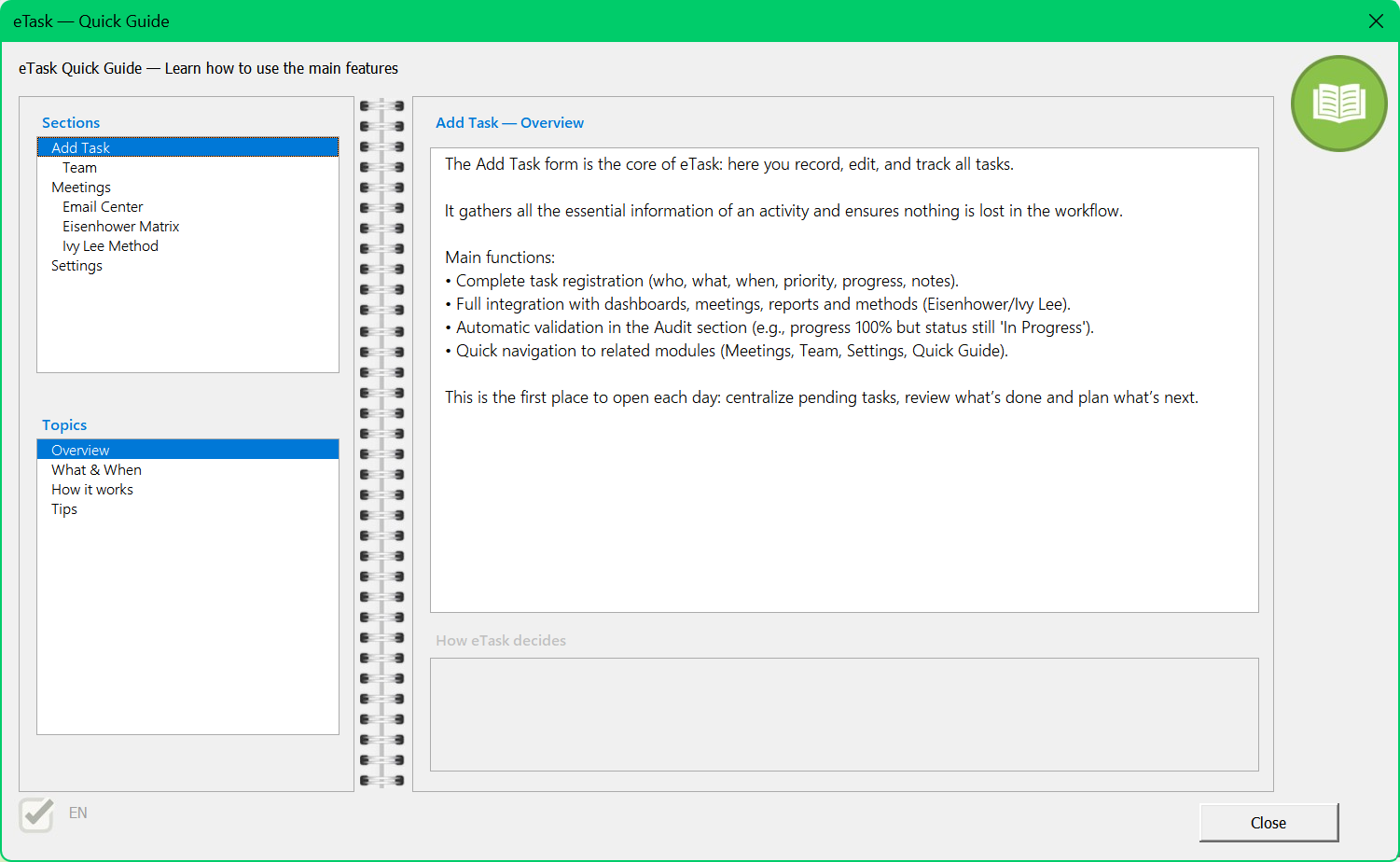
Interactive quick manual inside the app.
Interactive guide organized by sections and topics, as a quick reference for daily use.
Built to stop follow-up chaos and make responsibilities and progress visible — fast.
Everything in one place — with clear owners, deadlines, priorities and progress in a format the team understands immediately.
The Meetings panel consolidates the workload, helps identify delays, unblock bottlenecks and document decisions without wasting time.
Export summaries to PDF, Excel or CSV and send updates/reports directly to your team with integrated email automation.
Built in Excel with intuitive flows and a clean layout, it helps maintain discipline, transparency and accountability — without new platforms, logins or dependencies.
With multilingual support and flexible settings, it fits teams, operational routines, projects and personal productivity.
The eTask - Smart Task & Team Manager is an Excel-based productivity system designed to bring organization, clarity and accountability to daily task management and team coordination. It centralizes planning, progress tracking, deadlines, meeting follow-ups and communication in a structured environment — fully offline, with complete control over your data.
In both editions (Basic and Full), you register tasks, assign owners, update priorities and deadlines, document decisions in the Meetings panel and export reports in PDF, Excel or CSV. The system also includes email automation, allowing you to send follow-ups and task summaries via Outlook, Gmail or your default client.
The tool promotes clarity, consistency and disciplined routines, helping teams avoid follow-up chaos and maintain a stable workflow.
The Full Edition adds two strategic productivity frameworks — Eisenhower Matrix and the Ivy Lee Method — for deeper prioritization, execution focus and structured daily planning. These modules are exclusive to Full and are not available in Basic.
With full availability in English, Portuguese, Spanish, French, German and Italian, plus configurable date formats such as ISO (YYYY-MM-DD), DMY with slashes (DD/MM/YYYY) and the US format (MM/DD/YYYY), the system adapts well to local and international teams.
 When eTask is the right choice
eTask is ideal for professionals, managers and teams looking for a structured and reliable environment inside Excel.
If you want prioritization tools, the Full Edition includes Eisenhower and Ivy Lee for daily focus.
 When eTask is not the best option
It may not be ideal for users who need real-time cloud collaboration, simultaneous editing or deep web integrations.
There may also be limitations in environments with restricted VBA, such as some corporate networks or certain Excel versions on macOS.
Users who need advanced scheduling (e.g., Gantt) or fully cloud-native workflows may prefer dedicated solutions.
Start with the demo. If you decide to buy during the trial, you get 20% off the Full Edition.
Full features for 7 days. Test Meetings, Dashboards and Email Follow-ups with real workflows.
⬇ Demo 20% off during the demoEverything in Basic, plus Eisenhower Matrix + Ivy Lee Method. Best for prioritization and execution discipline.
Buy Full EditionCore system: Tasks, Meetings, Dashboards, Email Center and Reports. Ideal for most workflows.
Buy Basic EditionEssential details about compatibility, included files and system requirements.
 File type
Excel .xlsm
(macro-enabled workbook)
 Included files
• eTask workbook
• Quick Start PDF
• Sample data to test the modules
 File size
Download: ~12.4 MB (ZIP)
Includes: XLSM ~5.9 MB • PDF ~7.2 MB
 Compatibility
• Excel 2016 or later on Windows
• Macros (VBA) must be enabled
• Runs offline (no cloud)
Compare editions and choose the best fit for your routine.
US$ 5.99
Everything in Basic, plus Eisenhower Matrix + Ivy Lee Method. Best for prioritization and execution discipline.
Buy Full EditionUS$ 3.99
Core system: Tasks, Meetings, Dashboards, Email Center and Reports. Ideal for most workflows.
Buy Basic EditioneTask – Smart Task & Team Manager was built inside Excel because Excel is already part of the daily routine of most professionals and companies across different industries. Over time, it became clear that a large part of work tracking — deadlines, lists and follow-ups — already happens in spreadsheets, even with other tools in parallel.
When new platforms enter this workflow, the result is often the opposite: multiple sources of information appear, updates lose consistency and control becomes fragmented. Centralizing tracking in a tool that is already part of the routine reduces friction. eTask was born from this perception, with the goal of structuring and professionalizing Excel as a central management environment.
It also became clear that teams rarely fail due to lack of effort. Most failures come from misunderstandings, operational conflicts and frustration caused by large and complex tasks with no visible progress. When extensive activities are not properly broken down, progress becomes invisible, motivation drops and priorities get confused.
eTask acts exactly at this point: it allows large tasks to be divided into smaller, objective and trackable deliverables — making the owner, due date and status of each activity clear. The focus is not to create bureaucracy, but to ensure that time spent organizing is never greater than time spent executing.
eTask is developed by Fabio Damfus, a mechanical engineer who, over time, observed how fragmented information, lack of progress visibility and overly complex controls negatively impact execution.
Built for teams and professionals who use Excel daily and need more clarity, organization and consistent execution.